
Heritage Park · Member site care
Graveyard Area
A guide to storing excess items as referenced in club rule 34(2). Keep shed areas tidy, check ownership and record where every moved item goes.
Find the area
Use the red outline on the aerial image to identify the area shown for excess-item storage.
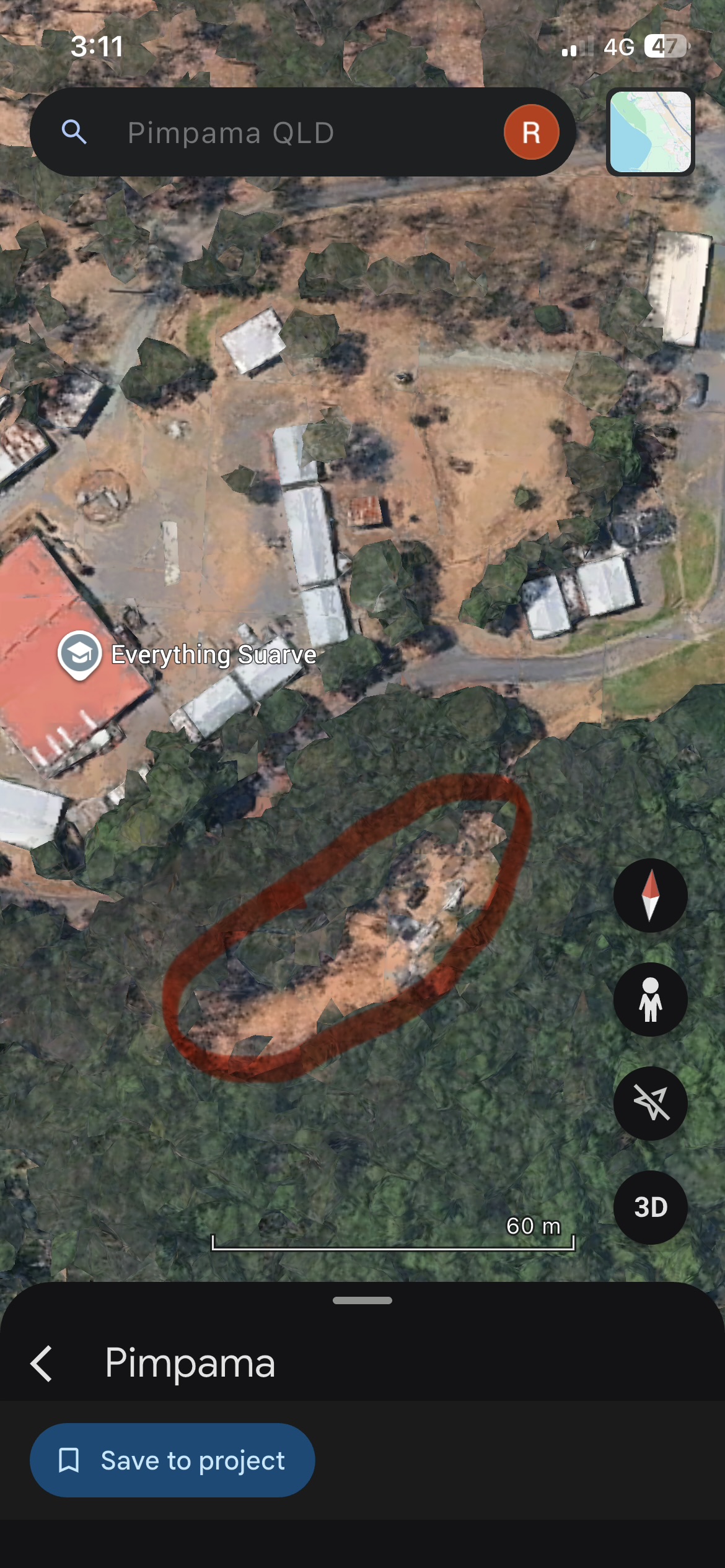
Marked image supplied by Rory Clark, Secretary. The outline is indicative. Confirm the agreed storage spot and safe access with the Secretary before moving anything.
Open the full marked map (opens in a new tab)Club rules reference
Rule 34(2)
Shed Owners' Rules · printed page 16
The supplied SCRS rules require:
- The area around sheds to be kept tidy.
- No machinery or parts stored outside the building, except for special external displays.
- Excess items to be stored in a designated graveyard area.
“Excess items are to be stored in a designated graveyard area.”
Reference: SCRS Rules 2016, rule 34(2), printed page 16. Contact the Secretary to confirm any later amendments.
Rule 33 also requires members to comply with the Council lease. The storage area must be used consistently with the lease and applicable site conditions.
Rule 34(2) does not name a location or show a boundary. The marked image is a separate location guide supplied for this page.
Before moving any item
Follow the Secretary's clean-up instructions below when organising a move. These steps support ownership checks and the Society's records.
Agree the move and check ownership
Contact Rory first to agree the item, storage spot, access and safe handling. Check who owns each item. If ownership is uncertain, leave it in place and ask the Secretary.
Keep every item on the property
Move items only to the agreed on-site location. No items are to be removed from the property under this clean-up request. This page does not authorise sale or disposal.
Photograph and record every move
Take before-and-after photos, plus a photo of each moved item at its new location. Send an item description, owner if known, old and new locations, date and the name of the person who moved it.
Keep the area tidy and access clear
Place items safely without obstructing paths or access. Arrange suitable help for heavy or unsafe items. Do not move fuel, chemicals or unidentified containers; report these to the Secretary.
Before-and-after photos are required, even when items remain elsewhere on site.
Send your before-and-after update
Photograph the same views before starting and after finishing every job. Include the action number, your name, date, work completed and anything outstanding. Send progress photos for partly completed work.
For every moved item, also send a photo at its new location, an item description, the owner if known, previous and new locations, date and the person who moved it.
Send photos to Rory, Secretary
SMS/MMS: 0410 816 886secretary@southcoastrestorationsocietyinc.org.auFor help choosing a job or sending an update, call Rory. The Secretary will match the photos to the task in the SCRS database and use them to report completed work and outstanding issues to Council.